

Punjab Driving License Verification:
Table of Contents
- What Is Punjab Driving License Verification?
- Why Punjab Driving License Verification Is Important
- What Is DLIMS Punjab?
- How to Do Punjab Driving License Verification Online
- Regular License Verification
- International License Verification
- Information Required for License Verification
- Understanding the Verification Results
- Common Errors and How to Fix Them
- Who Can Use the Punjab License Verification System?
- Safety Tips to Avoid Fake Driving Licenses
- Frequently Asked Questions (FAQs)
What Is Punjab Driving License Verification?
Punjab driving license verification is an official online process that allows citizens to check the authenticity and status of a driving license issued in Punjab. This service helps confirm whether a license is genuine, valid, and registered with the Punjab Traffic Police system.
The verification process is completely online, free of cost, and accessible to everyone without creating an account.
Why Punjab Driving License Verification Is Important
Verifying a driving license is essential for several reasons:
- To confirm the license is genuine and legally issued
- To avoid penalties for using fake or expired licenses
- For employers verifying drivers
- For travel, international permits, or official documentation
- To protect yourself from fraud and scams
With increasing cases of fake licenses, online verification has become a necessity rather than a choice.
What Is DLIMS Punjab?
DLIMS stands for Driving License Issuance Management System. It is an official digital platform managed by Punjab Traffic Police to handle:
- Issuance of new driving licenses
- Renewal and updates
- Record management
- Online verification of licenses
DLIMS Punjab provides a public verification tool that allows instant checking of license details.
How to Do Punjab Driving License Verification Online
The Punjab driving license verification process is simple and takes less than a minute if you have the correct details.
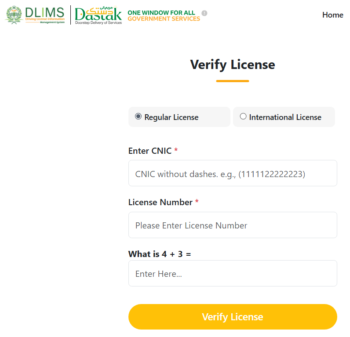
Step-by-Step Process
- Open your web browser and visit the official verification page:
https://dlims.punjab.gov.pk/verify
https://dastak.punjab.gov.pk - On the page, locate the “Verify License” section.
- Select the license type:
- Regular License (most commonly used)
- International License
- Enter the required details based on license type.
- Solve the simple math captcha shown on the screen.
- Click on the Verify License button.
If the details are correct and the license is valid, the system will instantly display the license record.
Regular License Verification
For a regular Punjab driving license, you will need:
- 13-digit CNIC number (without dashes)
- Driving License Number
International License Verification
For an international driving license, the required details are:
- Passport Number
- Driving License Number
Information Required for License Verification
Make sure the information you enter matches official records:
- CNIC or passport number should be accurate
- License number must be entered correctly
- Do not include spaces or special characters
Even a small typing mistake can cause verification failure.
Understanding the Verification Results
If the license is valid, DLIMS will display:
- License holder name
- Father’s name
- License status (valid or expired)
- Issue and expiry dates
- Vehicle categories allowed
If the system does not find a match, it will show an error message indicating invalid or unregistered details.
Common Errors and How to Fix Them
Here are some common issues users face:
- Incorrect CNIC format: Always enter 13 digits without dashes
- Wrong license number: Double-check spelling and digits
- Expired license: Renew the license through DLIMS
- Data not found: License may not be registered or could be fake
If problems persist, visit your nearest traffic police licensing office.
Download Driving Sign Tests App

Who Can Use the Punjab License Verification System?
This service is useful for:
- Individual drivers
- Employers and transport companies
- Rental car services
- Law enforcement agencies
- Travel and visa offices
No registration or login is required to use the system.
Safety Tips to Avoid Fake Driving Licenses
- Always verify your license after issuance
- Never trust agents offering “quick licenses”
- Use only official Punjab Traffic Police channels
- Keep screenshots or printouts of verification results
Online verification is the safest way to confirm authenticity.
Frequently Asked Questions (FAQs)
Is Punjab driving license verification free?
Yes, the verification service on DLIMS Punjab is completely free.
Can I verify someone else’s driving license?
Yes, as long as you have the required details, verification is public.
Do I need to create an account on DLIMS?
No account or login is required for license verification.
What if my license does not appear in the system?
It may be unregistered, expired, or fake. Visit the nearest traffic police office for assistance.
Is the DLIMS verification system official?
Yes, it is an official service provided by Punjab Traffic Police.
Punjab driving license verification through DLIMS is a quick, reliable, and secure way to confirm your license details. Make it a habit to verify your license and stay legally protected on the road.